Chat Retrieval
Every time you ask a question, Retriqs runs a retrieval pipeline in the background to fetch relevant data.
This guide explains how that process works and how you can configure it.
Last updated: April 4, 2026
Prerequisites
- You need to be familiar with the basic Chats Overview interface.
- Keep in mind that retrieval behavior depends entirely on the embeddings and models configured for your workspace.
How retrieval works
This background pipeline:
- finds relevant chunks of text
- identifies related entities
- explores relationships in the graph
The result of this process is used to generate the final answer.
If you ask a follow-up question, the retrieval process runs again based on the new input.
This means each message has its own independent retrieval step.
Adjusting retrieval settings
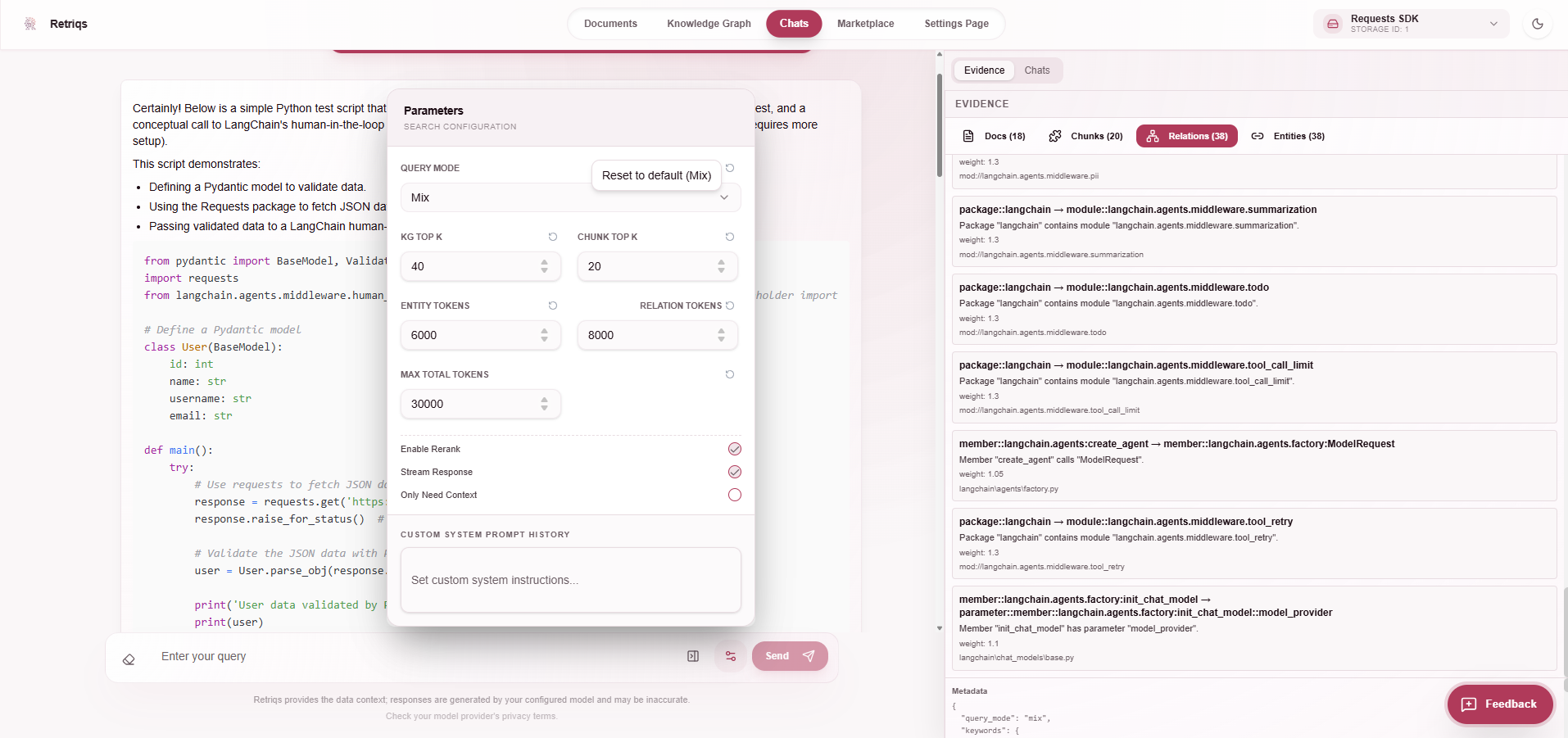
You can fine-tune how retrieval behaves using the settings panel.
Available controls include:
- query mode (e.g. Mix)
- number of chunks and graph results (Top K)
- token limits for entities and relationships
- maximum total tokens
- reranking
- streaming responses
These settings let you balance between speed, cost, and answer quality.